Have AI help build your Promptinator shortcodes or keyword list @ https://bestdealon.com/promptinator/
Promptinator Demo – Send to email
Write a bedtime story titled [A-story_title-~Magical Night Adventure~] for a [D-child_gender-|girl|boy|~girl~] named [-child_name~Melanie~] and her [B-pet-|dog|cat|lizzard|~Dog~] named [-pet name-~Bubba~]. The plot must feature [C-themes-|unicorns|spaceships|fairy tales|dragons|~unicorns, fairy tales~] and be told in a [B-tone-|gentle|funny|adventurous|~gentle~] tone. Provide exactly [D-paragraphrs-5~3~] paragraphs.
[E-Business Survey-~john@rfsafe.com~]
Promptinator Demo Post To Form Edit Main Prompt Disabled
Write a bedtime story titled [A-story_title-~Magical Night Adventure~] for a [D-child_gender-|girl|boy|~girl~] named [-child_name~Melanie~] and her [B-pet-|dog|cat|lizzard|~Dog~] named [-pet name-~Bubba~]. The plot must feature [C-themes-|unicorns|spaceships|fairy tales|dragons|~unicorns, fairy tales~] and be told in a [B-tone-|gentle|funny|adventurous|~gentle~] tone. Provide exactly [D-paragraphrs-5~3~] paragraphs.
[E-Feedback Form2-~https://rfsafe.com/submit-feedback.php~]
Promptinator Demo Send to AI – Free
Write a bedtime story titled [A-story_title-~Magical Night Adventure~] for a [D-child_gender-|girl|boy|~girl~] named [-child_name~Melanie~] and her [B-pet-|dog|cat|lizzard|~Dog~] named [-pet name-~Bubba~]. The plot must feature [C-themes-|unicorns|spaceships|fairy tales|dragons|~unicorns, fairy tales~] and be told in a [B-tone-|gentle|funny|adventurous|~gentle~] tone. Provide exactly [D-paragraphrs-5~3~] paragraphs.
Promptinator Demo Disable Edit Main Prompt
Write a bedtime story titled [A-story_title-~Magical Night Adventure~] for a [D-child_gender-|girl|boy|~girl~] named [-child_name~Melanie~] and her [B-pet-|dog|cat|lizzard|~Dog~] named [-pet name-~Bubba~]. The plot must feature [C-themes-|unicorns|spaceships|fairy tales|dragons|~unicorns, fairy tales~] and be told in a [B-tone-|gentle|funny|adventurous|~gentle~] tone. Provide exactly [D-paragraphrs-5~3~] paragraphs.
Promptinator Demo Edit and Disable think
Write a bedtime story titled [A-story_title-~Magical Night Adventure~] for a [D-child_gender-|girl|boy|~girl~] named [-child_name~Melanie~] and her [B-pet-|dog|cat|lizzard|~Dog~] named [-pet name-~Bubba~]. The plot must feature [C-themes-|unicorns|spaceships|fairy tales|dragons|~unicorns, fairy tales~] and be told in a [B-tone-|gentle|funny|adventurous|~gentle~] tone. Provide exactly [D-paragraphrs-5~3~] paragraphs.
Promptinator Demo Default Think and Disable Edit
Write a bedtime story titled [A-story_title-~Magical Night Adventure~] for a [D-child_gender-|girl|boy|~girl~] named [-child_name~Melanie~] and her [B-pet-|dog|cat|lizzard|~Dog~] named [-pet name-~Bubba~]. The plot must feature [C-themes-|unicorns|spaceships|fairy tales|dragons|~unicorns, fairy tales~] and be told in a [B-tone-|gentle|funny|adventurous|~gentle~] tone. Provide exactly [D-paragraphrs-5~3~] paragraphs.
Promptinator by Melanie AI: White Paper
Introduction
Promptinator is a revolutionary lightweight scripting engine designed by Melanie AI (Machine Enhanced Logic and Natural Intelligence Engine). It transforms static HTML or text into dynamic, interactive prompts and forms, significantly simplifying form creation and interaction with AI interfaces. Promptinator achieves this functionality through a concise, shortcode-based syntax that can operate seamlessly within any website or CMS environment, notably WordPress, without external dependencies.
Overview of Promptinator Tokens
Promptinator tokens are short, intuitive placeholders embedded directly into textual content. Each token has a specific role, allowing dynamic interaction with users. Below is a comprehensive overview of each token type, their syntax, usage examples, and the user-facing outcome.
Token A: Multiline Text Input
The [A] token creates a multiline textarea, ideal for open-ended questions, detailed responses, or descriptive text.
Syntax Example:
[A-story_description-~Describe your experience~]
User View: A textarea labeled “Story Description,” pre-filled with “Describe your experience,” allowing extensive user input.
Token B: Radio Buttons
The [B] token generates radio buttons, allowing users to select one option from multiple predefined choices.
Syntax Example:
[B-tone-|Formal|Casual|Friendly|~Casual~]
User View: Radio buttons for “Formal,” “Casual,” and “Friendly,” with “Casual” pre-selected.
Token C: Checkbox Group
The [C] token produces multiple checkboxes, enabling users to choose multiple items from a provided list.
Syntax Example:
[C-preferences-|Newsletters|Product Updates|Promotions|~Newsletters~]
User View: Checkboxes displayed with “Newsletters” pre-selected. Users can choose multiple options.
Token D: Dropdown Menus
This token supports numeric and text-based dropdown menus.
- Numeric Dropdown Example:
[D-quantity-10~2~]
User View: Dropdown numbers from 1 to 10, defaulting to 2.
[D-package_type-|Standard|Premium|Enterprise|~Premium~]
User View: Dropdown menu with “Premium” selected by default.
Token E: Submit/Send Button
The [E] token dynamically generates a button that either opens the user’s email client (Send) or submits form data directly to your server (Submit). Promptinator intelligently chooses the button type based on the provided value.
Email Submission Example:
[E-Business Survey-~m@myemail.com~]
User View: A “Send Email” button that launches the user’s email client with a preformatted email containing submitted values.
Form Submission Example:
[E-feedback-~https://yoursite.com/submit-feedback.php~]
User View: A “Submit Feedback” button that securely posts form data directly to a specified server endpoint.
Token I: URL Picker & Iframe
The [I] token allows selection from a predefined list of URLs, presenting a live inline preview.
Syntax Example:
[I-reference-|https://example.com|https://anotherexample.com|~Select Resource~]
User View: A dropdown menu with URL choices and a dynamically displayed iframe preview of the chosen site.
Advanced Promptinator Controls
Promptinator provides powerful inline attributes directly within the main <div class="Promptinator"> element, offering granular control over prompt behavior.
- Disable Editing (
data-edit="0"): Prevents users from editing the prompt text itself, allowing interaction only with specified dynamic fields.
<div class="Promptinator" data-edit="0">
- Disable AI Buttons (
data-think="0"): Removes AI-related buttons (e.g., ChatGPT, Copilot) from appearing, ideal for human-to-human form interactions.
<div class="Promptinator" data-think="0">
- Combine Controls: Lock down both editing and AI interactions for controlled form submissions.
<div class="Promptinator" data-edit="0" data-think="0">
Promptinator Pro: Next-Level Integration
The upcoming Promptinator Pro version unlocks the integration of local AI services, turning Promptinator into a sophisticated form and prompt engine capable of:
- Leveraging self-hosted or local AI models (e.g., Ollama, LLaMA).
- Creating dynamic document generation and automated form interactions.
- Real-time, AI-powered form interactions without page reloads.
Training local AI models with Promptinator shortcodes revolutionizes human-to-AI and human-to-human interactions, creating intuitive, seamless digital experiences.
Why Promptinator’s Syntax is Revolutionary
Promptinator introduces an unprecedented, ultra-lightweight form-building syntax. Unlike traditional form builders reliant on heavy JavaScript frameworks, complex JSON schemas, or drag-and-drop tools, Promptinator’s shortcodes are concise, readable, and easily generated by both humans and AI.
This efficiency significantly reduces processing overhead, bandwidth consumption, and improves user experience, especially beneficial in high-traffic or AI-driven scenarios.
Conclusion
Promptinator by Melanie AI represents a quantum leap in web-form interactions and dynamic content generation. Its elegant shortcode syntax, combined with intuitive inline attributes and compatibility with local AI platforms, positions Promptinator as a future-proof solution, revolutionizing how users interact with forms and digital content.
By training your AI with Promptinator syntax, you pave the way for intelligent, responsive interactions that blend human creativity with machine efficiency—ushering in the next generation of digital communication.
Promptinator: Lightweight. Intuitive. Revolutionary.
Static Form Elements Making Prompts Dynamic
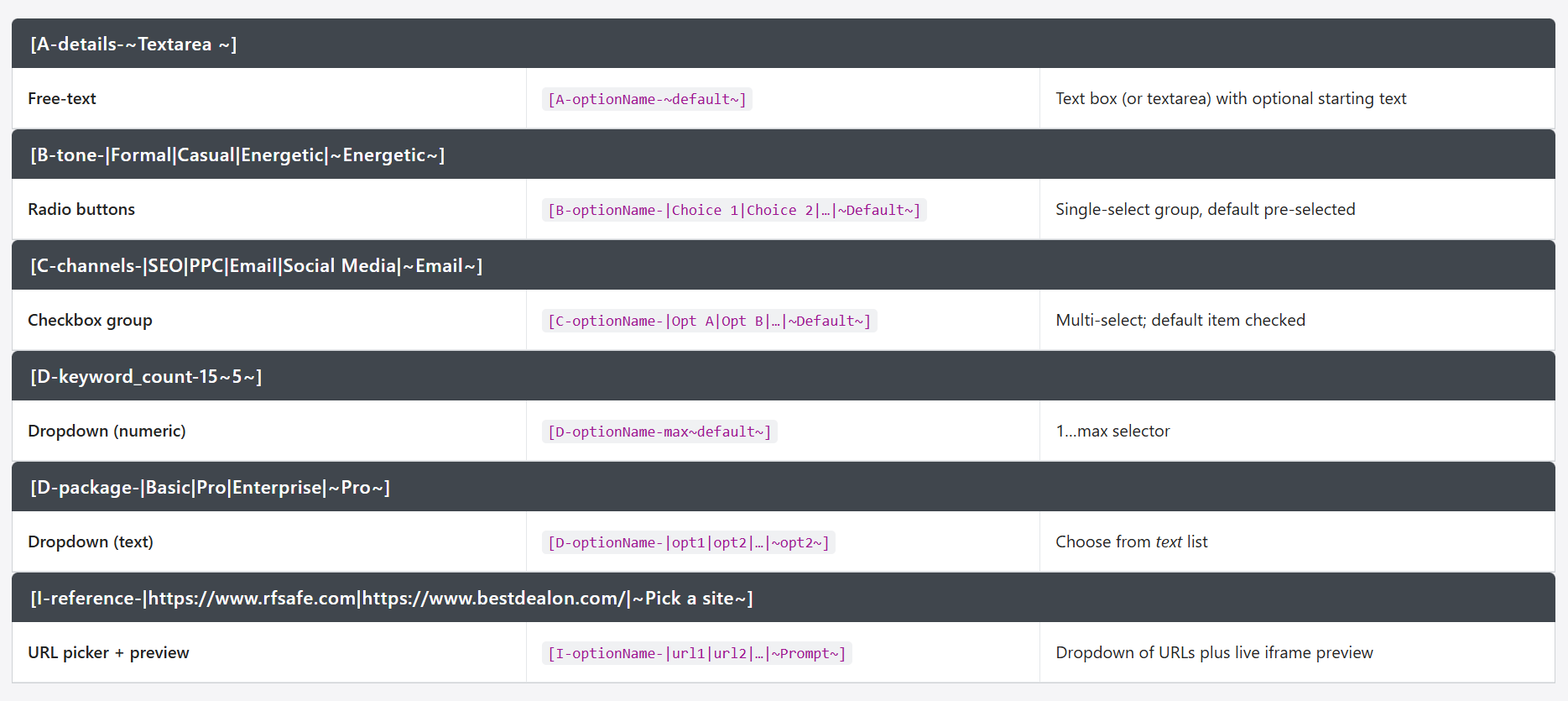
For everything else you choose the optionName—an identifier you invent—then supply choices or defaults.
Text Input
[A-optionName-~default text~]
Example: [A-offer_details-~Enter your special deal here…~]
Renders a text field or textarea pre-filled with your prompt.
Radio Buttons
[B-optionName-|Choice 1|Choice 2|…|~Default~]
Example: [B-tone-|Formal|Casual|Energetic|~Energetic~]
Renders a set of radio buttons; Energetic is selected by default.
Checkbox Group
[C-optionName-|Opt A|Opt B|…|~Default Opt~]
Example: [C-channels-|SEO|PPC|Email|Social Media|~Email~]
Renders multiple checkboxes; Email checked by default.
Dropdowns
-
Numeric: [D-optionName-max~default~]
Example: [D-keyword_count-15~5~] → select 1…15, default 5
-
Text: [D-optionName-|opt1|opt2|…|~opt2~]
Example: [D-package-|Basic Plan|Pro Plan|Enterprise Plan|~Pro Plan~] → Select Pro by default
Email/Submit
-
Email: [E-optionName-~m@myemail.com~~]
Example: [E-Business Survey-~m@myemail.com~]→ optionName Business Survey is email subject
-
Submit Form: [E-optionName-~https://yoursite.com/submit-feedback.php~]
Example: [E-feedback-~https://yoursite.com/submit-feedback.php~] → optionNamefeedback is form title
URL Picker + Iframe
[I-optionName-|https://site1.com|https://site2.com|~Default Prompt~]
Example:
[I-visit_site-|https://en.wikipedia.org/wiki/Bedtime_story|https://www.gutenberg.org/|~Pick a site~]
Renders a dropdown of URLs and an inline preview of the selected page.
Have AI help build your Promptinator shortcodes or keyword list @ https://bestdealon.com/promptinator/
Promptinator gives you the power to create interactive, dynamic prompts by simply placing smart tokens inside a <div class="Promptinator">. These tokens are what make your content come alive, transforming static text into editable fields and form submissions—all with minimal effort.
Promptinator Demo – Send to email
Write a bedtime story titled [A-story_title-~Magical Night Adventure~] for a [D-child_gender-|girl|boy|~girl~] named [-child_name~Melanie~] and her [B-pet-|dog|cat|lizzard|~Dog~] named [-pet name-~Bubba~]. The plot must feature [C-themes-|unicorns|spaceships|fairy tales|dragons|~unicorns, fairy tales~] and be told in a [B-tone-|gentle|funny|adventurous|~gentle~] tone. Provide exactly [D-paragraphrs-5~3~] paragraphs.
[E-Send via email-~me@email.com~]
Promptinator Demo Post To Form Edit Main Prompt Disabled
Write a bedtime story titled [A-story_title-~Magical Night Adventure~] for a [D-child_gender-|girl|boy|~girl~] named [-child_name~Melanie~] and her [B-pet-|dog|cat|lizzard|~Dog~] named [-pet name-~Bubba~]. The plot must feature [C-themes-|unicorns|spaceships|fairy tales|dragons|~unicorns, fairy tales~] and be told in a [B-tone-|gentle|funny|adventurous|~gentle~] tone. Provide exactly [D-paragraphrs-5~3~] paragraphs.
[E-Demo Post -~https://rfsafe.com/submit-feedback.php~]
Promptinator Demo Send to AI – Free
Write a bedtime story titled [A-story_title-~Magical Night Adventure~] for a [D-child_gender-|girl|boy|~girl~] named [-child_name~Melanie~] and her [B-pet-|dog|cat|lizzard|~Dog~] named [-pet name-~Bubba~]. The plot must feature [C-themes-|unicorns|spaceships|fairy tales|dragons|~unicorns, fairy tales~] and be told in a [B-tone-|gentle|funny|adventurous|~gentle~] tone. Provide exactly [D-paragraphrs-5~3~] paragraphs.
Promptinator Demo Disable Edit Main Prompt
Write a bedtime story titled [A-story_title-~Magical Night Adventure~] for a [D-child_gender-|girl|boy|~girl~] named [-child_name~Melanie~] and her [B-pet-|dog|cat|lizzard|~Dog~] named [-pet name-~Bubba~]. The plot must feature [C-themes-|unicorns|spaceships|fairy tales|dragons|~unicorns, fairy tales~] and be told in a [B-tone-|gentle|funny|adventurous|~gentle~] tone. Provide exactly [D-paragraphrs-5~3~] paragraphs.
Promptinator Demo Edit and Disable think
Write a bedtime story titled [A-story_title-~Magical Night Adventure~] for a [D-child_gender-|girl|boy|~girl~] named [-child_name~Melanie~] and her [B-pet-|dog|cat|lizzard|~Dog~] named [-pet name-~Bubba~]. The plot must feature [C-themes-|unicorns|spaceships|fairy tales|dragons|~unicorns, fairy tales~] and be told in a [B-tone-|gentle|funny|adventurous|~gentle~] tone. Provide exactly [D-paragraphrs-5~3~] paragraphs.
Promptinator Demo Default Think and Disable Edit
Write a bedtime story titled [A-story_title-~Magical Night Adventure~] for a [D-child_gender-|girl|boy|~girl~] named [-child_name~Melanie~] and her [B-pet-|dog|cat|lizzard|~Dog~] named [-pet name-~Bubba~]. The plot must feature [C-themes-|unicorns|spaceships|fairy tales|dragons|~unicorns, fairy tales~] and be told in a [B-tone-|gentle|funny|adventurous|~gentle~] tone. Provide exactly [D-paragraphrs-5~3~] paragraphs.
Static Form Elements Making Prompts Dynamic
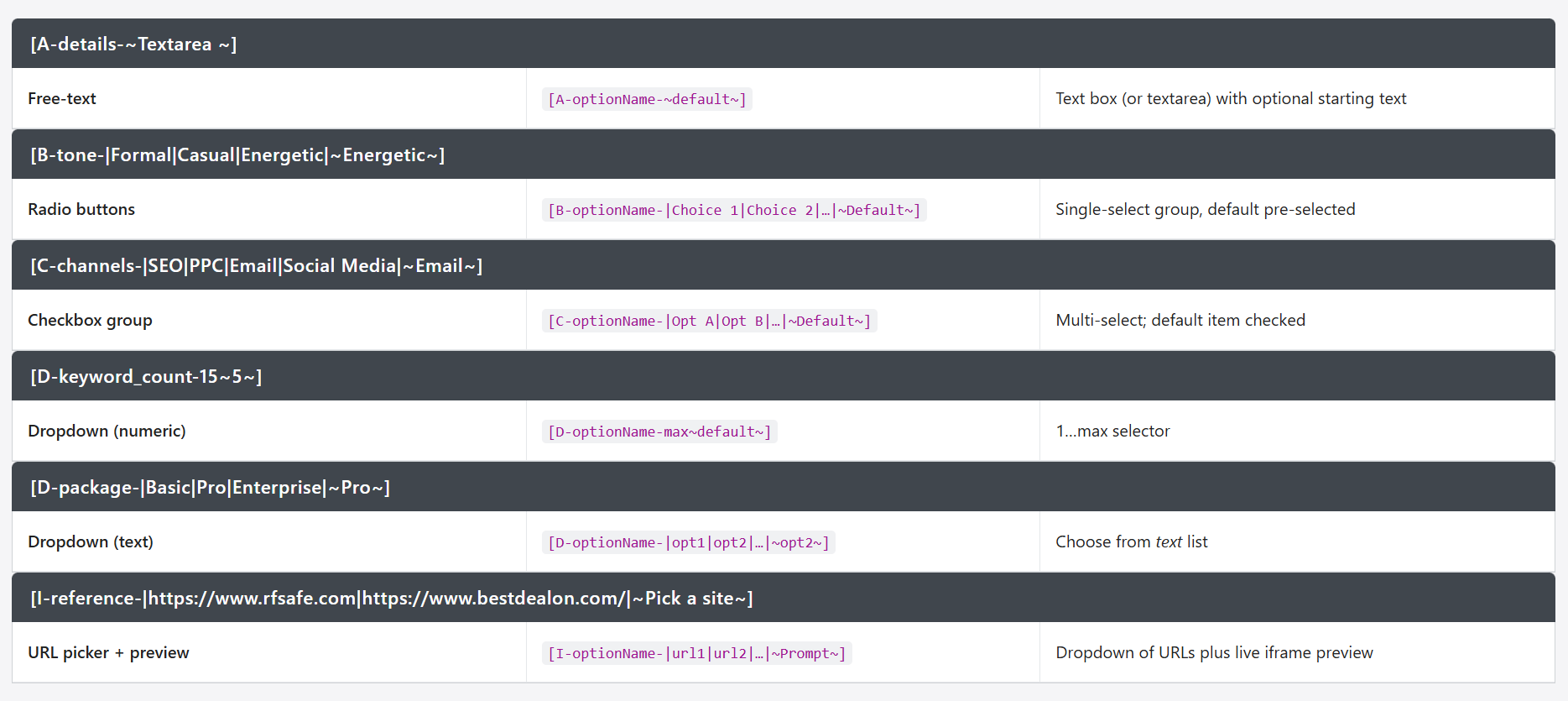
For everything else you choose the optionName—an identifier you invent—then supply choices or defaults.
Text Input
[A-optionName-~default text~]
Example: [A-offer_details-~Enter your special deal here…~]
Renders a text field or textarea pre-filled with your prompt.
Radio Buttons
[B-optionName-|Choice 1|Choice 2|…|~Default~]
Example: [B-tone-|Formal|Casual|Energetic|~Energetic~]
Renders a set of radio buttons; Energetic is selected by default.
Checkbox Group
[C-optionName-|Opt A|Opt B|…|~Default Opt~]
Example: [C-channels-|SEO|PPC|Email|Social Media|~Email~]
Renders multiple checkboxes; Email checked by default.
Dropdowns
-
Numeric: [D-optionName-max~default~]
Example: [D-keyword_count-15~5~] → select 1…15, default 5
-
Text: [D-optionName-|opt1|opt2|…|~opt2~]
Example: [D-package-|Basic Plan|Pro Plan|Enterprise Plan|~Pro Plan~] → Select Pro by default
Email/Submit
-
Email: [E-optionName-~m@myemail.com~~]
Example: [E-Business Survey-~m@myemail.com~]→ optionName Business Survey is email subject
-
Submit Form: [E-optionName-~https://yoursite.com/submit-feedback.php~]
Example: [E-feedback-~https://yoursite.com/submit-feedback.php~] → optionNamefeedback is form title
URL Picker + Iframe
[I-optionName-|https://site1.com|https://site2.com|~Default Prompt~]
Example:
[I-visit_site-|https://en.wikipedia.org/wiki/Bedtime_story|https://www.gutenberg.org/|~Pick a site~]
Renders a dropdown of URLs and an inline preview of the selected page.
Promptinator by Melanie AI: Revolutionizing Dynamic Web Interaction and AI Integration